> ## Documentation Index
> Fetch the complete documentation index at: https://docs.nivara.io/llms.txt
> Use this file to discover all available pages before exploring further.

# 3A Brands Documentation

> AI-powered solutions for 3A Brands, enhancing customer service and operational efficiency

```mermaid theme={null}
flowchart TD
    A["Nivara Customer Service AI"]
   
    %% Tools
    B["Tool 1: Create Sales Conditions"]
    C["Tool 2: Automate Shipment Tracking"]
    D["Tool 3: Generate XLS File (Data Registry)"]
   
    %% AI Agent uses each tool
    A --> B
    A --> C
    A --> D
   
    %% Sales Conditions Process
    B --> B1["Select Type of Sales Condition"]
    B1 --> B2["Enter relevant data in form"]
    B2 --> B3["Submit form"]
    B3 --> B4["Create Sales Condition record"]
   
    %% Shipment Tracking Process
    C --> C1["Access multiple carrier portals"]
    C1 --> C2["Retrieve shipment status"]
    C2 --> C3["Provide status update"]
   
    %% XLS File Generation Process
    D --> D1["Call ERP API"]
    D1 --> D2["Extract required data"]
    D2 --> D3["Generate structured XLS file"]

```

## Project Overview

### About 3A Brands

3A is a leading company in Italy in the distribution of clothing, footwear, and accessories, offering a wide range of products to both consumers and business partners. With a strong presence in the market and a commitment to quality, 3A Sport is constantly seeking ways to enhance customer satisfaction and streamline its operations.

<div className="mt-6 p-4 border rounded-lg bg-gradient-to-r from-gray-50 to-gray-100 dark:from-gray-900 dark:to-gray-800">
  <h3 className="font-bold">Key Challenges</h3>

  <ul className="mt-2 space-y-2">
    <li> High Dependency on Manual Processes</li>
    <li> Time-Consuming Administrative Tasks</li>
    <li> Inefficient Ticket and Query Handling</li>
    <li> Inefficient Ticket Management</li>
  </ul>
</div>

<Note>
  3A Brands partnered with Nivara to implement AI solutions that streamline operations, enhance customer service, and automate manual processes for improved efficiency and customer satisfaction.
</Note>

### Our Solution

Nivara developed a comprehensive AI ecosystem for 3A Brands, integrating multiple technologies to address their specific challenges.

<CardGroup cols={2}>
  <Card title="Sales Condition Creation" icon="file-contract" color="#16A34A">
    Creating sales conditions by automating the extraction of relevant data from customer communications and determining pricing, discounts, and surcharges based on pre-defined business rules.
  </Card>

  <Card title="Centralized Shipment Tracking" icon="truck" color="#16A34A">
    Replace the current manual, multi-portal login process with a unified tracking system that aggregates shipment data from various shipping providers.
  </Card>

  <Card title="Automated ERP Data Registry Generation" icon="file-excel" color="#16A34A">
    Automate the creation of structured XLS reports by extracting and transforming ERP data, thereby reducing manual intervention and ensuring up-to-date, accurate reporting.
  </Card>

  <Card title="Conversational AI Interface" icon="comments" color="#16A34A">
    Advanced natural language processing to understand and respond to customer queries, streamlining the customer service process.
  </Card>
</CardGroup>

### Implementation Approach

<Steps>
  <Step title="Phase 1: Assessment">
    Comprehensive interviews and surveys to understand 3A Brands' existing systems, workflows, and pain points.
  </Step>

  <Step title="Phase 2: Planning">
    Detailed analysis and AI solution design tailored to 3A Brands' specific requirements and business processes.
  </Step>

  <Step title="Phase 3: Execution">
    Implementation of the Nivara Customer Service AI platform with its core features, followed by testing and deployment.
  </Step>
</Steps>

# Getting Started with Nivara Customer Service AI

<Note>
  This guide will help you understand the Nivara Customer Service AI application and how to get started with using its various features.
</Note>

### Overview

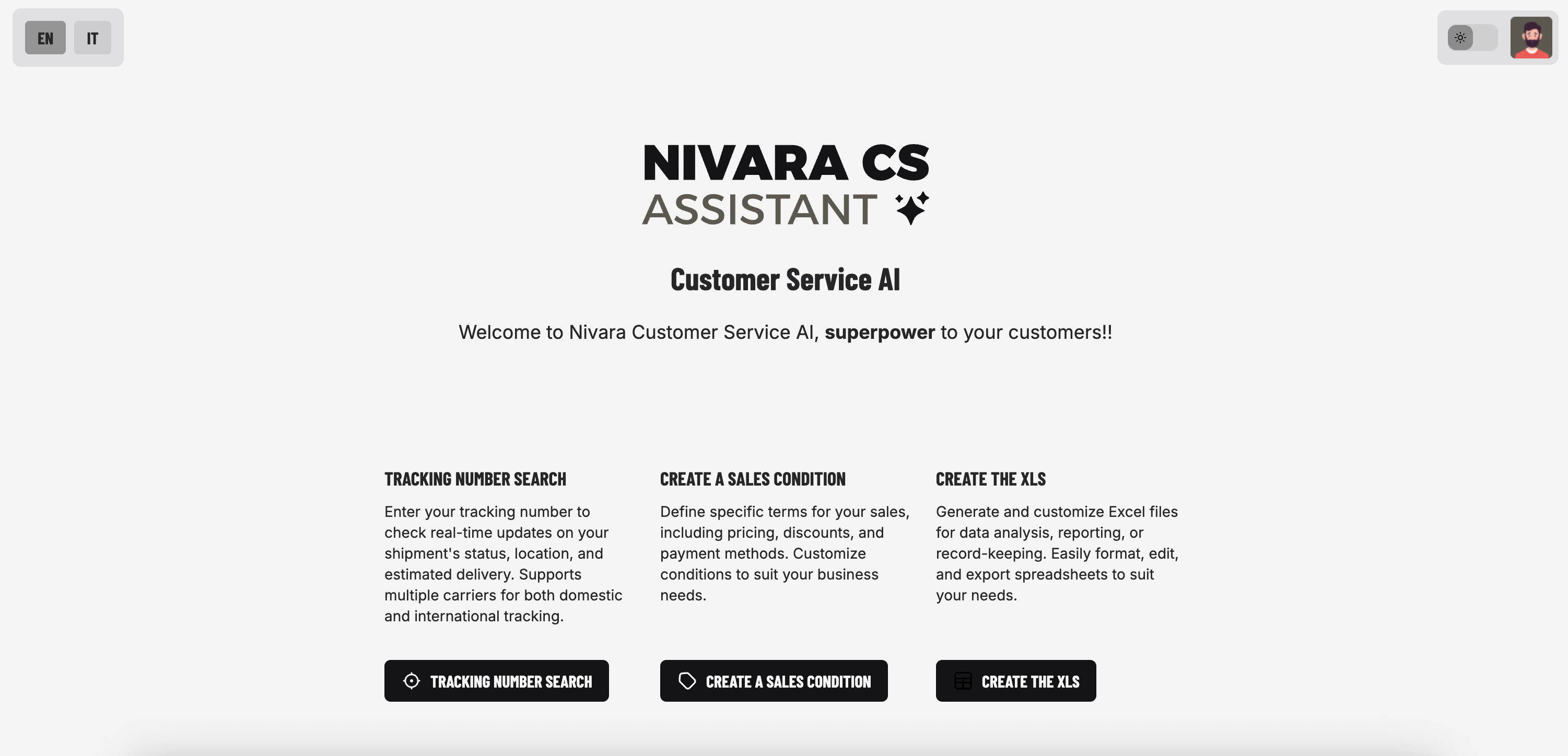
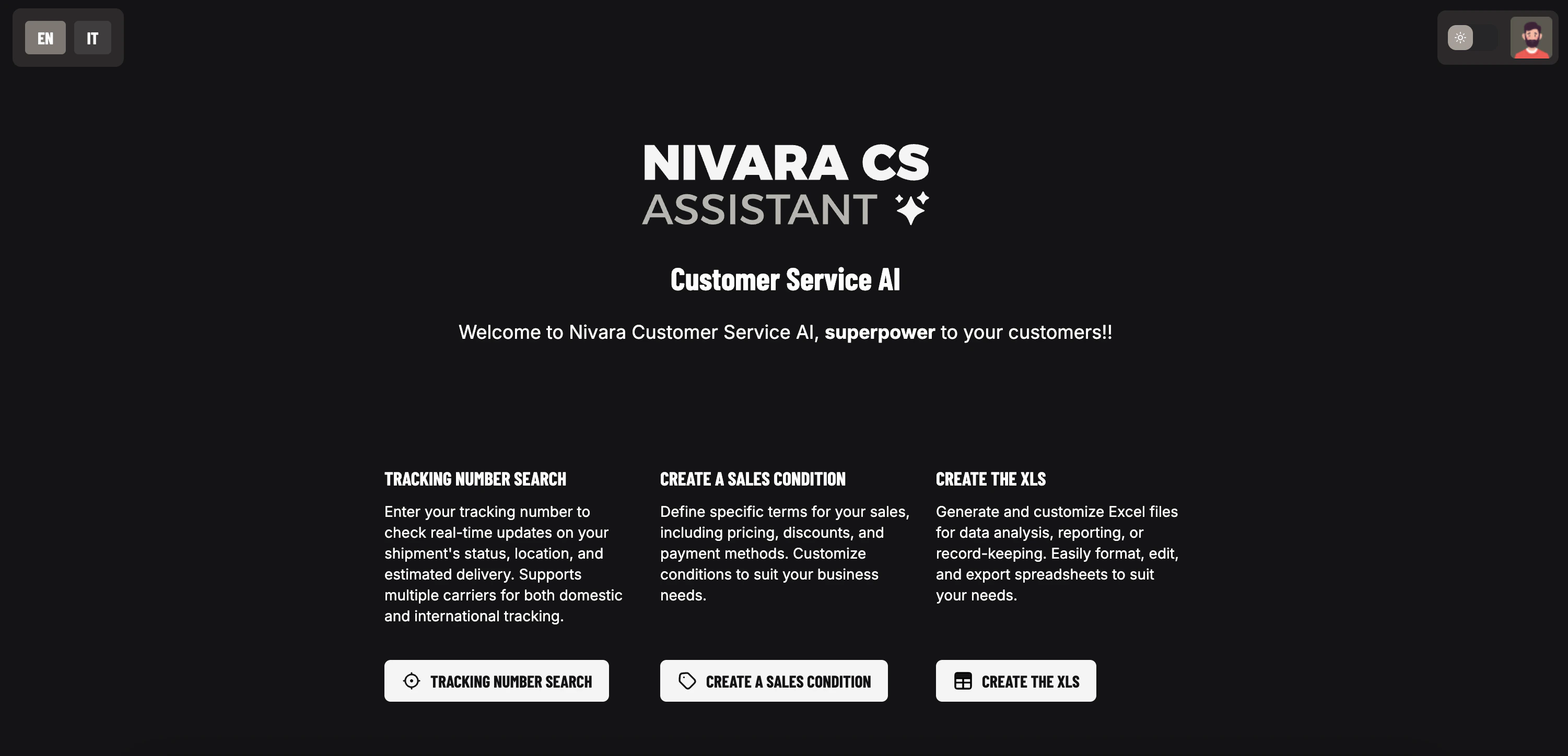
Nivara Customer Service AI is a comprehensive solution designed to streamline shipment tracking, sales condition management, and excel report generation. With its intuitive interface and powerful features, Nivara Customer Service AI helps you manage your customer service operations efficiently.

<img className="block dark:hidden" src="https://mintcdn.com/nivara/BdU5x643xwbrBgr0/projects/3a-brands/images/nivara_cs_ai_light.png?fit=max&auto=format&n=BdU5x643xwbrBgr0&q=85&s=839292127f74158b2b57647aa7ac3c0b" alt="Nivara Customer Service AI Dashboard Light" width="3002" height="1448" data-path="projects/3a-brands/images/nivara_cs_ai_light.png" />

<img className="hidden dark:block" src="https://mintcdn.com/nivara/BdU5x643xwbrBgr0/projects/3a-brands/images/nivara_cs_ai_dark.png?fit=max&auto=format&n=BdU5x643xwbrBgr0&q=85&s=789cc05195cf6c7a5b52eb551e3279fe" alt="Nivara Customer Service AI Dashboard Dark" width="3002" height="1448" data-path="projects/3a-brands/images/nivara_cs_ai_dark.png" />

### System Requirements

<div className="mt-4 p-4 border rounded-lg bg-gradient-to-r from-blue-50 to-indigo-50 dark:from-blue-900 dark:to-indigo-900">
  <h3 className="font-bold">Application Requirements</h3>

  <ul className="mt-2 space-y-2">
    <li> <strong>Web Browser:</strong> Latest version of Chrome, Firefox, Safari, or Edge</li>
    <li> <strong>Internet Connection:</strong> Required for accessing the application</li>
  </ul>
</div>

<Callout type="info">
  Nivara Customer Service AI is optimized for modern browsers and responsive design, allowing you to access it from any device with an internet connection.
</Callout>

### Authentication

Nivara Customer Service AI leverages [Supabase](https://supabase.com/) to implement a secure authentication system with comprehensive user management features:

<AccordionGroup>
  <Accordion title="Login Options">
    Nivara Customer Service AI uses a secure whitelisted email login system. Users enter their email address to receive a magic link for authentication.
  </Accordion>

  <Accordion title="User Access">
    Only whitelisted email addresses can access the portal. Contact your administrator to be added to the whitelist.
  </Accordion>

  <Accordion title="Access Control">
    Protected routes require authentication via magic link. Unauthenticated users and non-whitelisted emails will be redirected to the login page.
  </Accordion>
</AccordionGroup>

## Quick Start

Follow these steps to quickly get started with Nivara Customer Service AI:

<Steps>
  <Step title="Log In/Create an Account">
    Visit the [Nivara Customer Service AI Login Page](https://demo.nivara.io/en/auth) and enter your email to receive the magic link.
  </Step>

  <Step title="Explore the Dashboard">
    Navigate to the dashboard to get an overview and enquire about the available features.
  </Step>

  <Step title="Track Your First Shipment">
    Use the shipment tracking feature to search for and track your first shipment.
  </Step>

  <Step title="Create a Sales Condition">
    Set up your first sales condition to streamline your business operations.
  </Step>

  <Step title="Generate Excel Report">
    Fetch data from your registry in an Excel format.
  </Step>
</Steps>

### Core Components

Nivara Customer Service AI offers a comprehensive set of features designed to streamline your customer service operations:

<div className="space-y-8">
  <div className="p-6 border rounded-lg bg-gradient-to-r from-indigo-50 to-purple-50 dark:from-indigo-900 dark:to-purple-900">
    <h3 className="text-xl font-bold mb-4 flex items-center">
      <span className="mr-2">
        <i className="fas fa-magnifying-glass-location" />
      </span>

      Shipment Tracking
    </h3>

    <p className="mb-3">Search for shipments by customer name or order ID with intelligent matching capabilities.</p>

    <ul className="space-y-2">
      <li> View detailed shipment information</li>
      <li> Natural language query interface</li>
      <li> Fuzzy matching for customer names</li>
    </ul>
  </div>

  <div className="p-6 border rounded-lg bg-gradient-to-r from-green-50 to-teal-50 dark:from-green-900 dark:to-teal-900">
    <h3 className="text-xl font-bold mb-4 flex items-center">
      <span className="mr-2">
        <i className="fas fa-file-contract" />
      </span>

      Sales Condition Creation
    </h3>

    <p className="mb-3">Create and manage comprehensive sales conditions for your customers.</p>

    <ul className="space-y-2">
      <li> Detail-based or type-based conditions</li>
      <li> Customizable pricing and discounts</li>
      <li> Payment terms management</li>
    </ul>
  </div>

  <div className="p-6 border rounded-lg bg-gradient-to-r from-blue-50 to-cyan-50 dark:from-blue-900 dark:to-cyan-900">
    <h3 className="text-xl font-bold mb-4 flex items-center">
      <span className="mr-2">
        <i className="fas fa-file-excel" />
      </span>

      Excel Report Generation
    </h3>

    <p className="mb-3">Generate customized Excel reports with comprehensive filtering options.</p>

    <ul className="space-y-2">
      <li> Filter by customers and orders</li>
      <li> Downloadable Excel format</li>
    </ul>
  </div>

  <div className="p-6 border rounded-lg bg-gradient-to-r from-rose-50 to-pink-50 dark:from-rose-900 dark:to-pink-900">
    <h3 className="text-xl font-bold mb-4 flex items-center">
      <span className="mr-2">
        <i className="fas fa-comments" />
      </span>

      Conversation History
    </h3>

    <p className="mb-3">Maintain and manage conversation history for all features.</p>

    <ul className="space-y-2">
      <li> Save and retrieve conversations</li>
      <li> Rename and organize threads</li>
      <li> Context-aware responses</li>
    </ul>
  </div>
</div>

## Tech Stack

### Frontend

* **TypeScript**: Core UI

{/* - **Bootstrap**: CSS framework for responsive design */}

{/* - **Fetch API**: For asynchronous requests to the backend */}

### Backend

* **FastAPI**: Modern, high-performance web framework for building APIs
* **Uvicorn**: ASGI server for FastAPI
* **Python**: Programming language
* **SQLite**: Database for storing conversations, user profiles, and shipping records

### Deployment

* **Docker**: Containerization for consistent deployment
* **Compute Engine**: Application Serving
* **GitHub Actions & WatchTower**: CI/CD pipeline for automated deployment

## Agent Details

Nivara Customer Service AI uses OpenAI's language models to power its conversational interfaces:

### Agent Implementation

* **Models Used**:
  * OpenAI o3-mini: For shipment tracking, sales condition, and Excel download agents
* **Framework**: pydantic-ai for agent creation and management
* **Agent Types**:
  * Shipment Tracking Agent: Handles shipment tracking queries
  * Sales Condition Agent: Assists with creating sales conditions
  * Excel Download Agent: Helps generate Excel reports

## Other Experiments

<Note>
  During the development of Nivara Customer Service AI, we conducted experiments with various LLM providers to evaluate their performance, reliability, and suitability for our specific use cases.
</Note>

<Tabs>
  <Tab title="Gemini">
    <div className="p-6 border rounded-lg bg-gradient-to-r from-purple-50 to-indigo-50 dark:from-purple-900 dark:to-indigo-900">
      <h3 className="text-xl font-bold mb-4 flex items-center">
        <span className="mr-2">
          <i className="fas fa-flask" />
        </span>

        Gemini 2.0 Flash Experiment
      </h3>

      <div className="mb-4">
        <p className="mb-3">We evaluated Google's Gemini 2.0 Flash model as an alternative to OpenAI's models for our agent implementation. Our testing revealed several limitations:</p>

        <div className="mt-4 p-4 border-l-4 border-purple-500 bg-purple-50 dark:bg-purple-900/30">
          <h4 className="font-semibold mb-2">Key Findings</h4>

          <li>Significant difficulties following precise formatting instructions compared to OpenAI's o3-mini model</li>
          <li>Inconsistent adherence to output structure requirements</li>
        </div>
      </div>

      <div className="mt-6">
        <h4 className="font-semibold mb-2">Conclusion</h4>
        <p>While Gemini showed promise in general language understanding, its limitations in following precise formatting instructions made it less suitable for our structured agent workflows, leading us to continue with OpenAI's models for production deployment.</p>
      </div>
    </div>
  </Tab>

  <Tab title="DeepSeek">
    <div className="p-6 border rounded-lg bg-gradient-to-r from-blue-50 to-cyan-50 dark:from-blue-900 dark:to-cyan-900">
      <h3 className="text-xl font-bold mb-4 flex items-center">
        <span className="mr-2">
          <i className="fas fa-flask" />
        </span>

        DeepSeek API Experiment
      </h3>

      <div className="mb-4">
        <p className="mb-3">We explored DeepSeek's API as a potential alternative for our agent implementation, but encountered significant reliability issues:</p>

        <div className="mt-4 p-4 border-l-4 border-blue-500 bg-blue-50 dark:bg-blue-900/30">
          <h4 className="font-semibold mb-2">Technical Challenges</h4>

          <li>Frequent empty responses from the API</li>
          <li>Recurring error: <code>raise exceptions.UnexpectedModelBehavior('Received empty model response')</code></li>
          <li>Inconsistent JSON mode functionality</li>
          <li>Limited reliability for production use cases</li>
        </div>
      </div>

      <div className="mt-6">
        <h4 className="font-semibold mb-2">Documentation Reference</h4>
        <p>These issues are documented in DeepSeek's official API documentation, indicating they are known limitations:</p>

        <a href="https://api-docs.deepseek.com/guides/json_mode" className="mt-2 inline-block px-4 py-2 bg-blue-600 text-white rounded-md hover:bg-blue-700 transition-colors">
          View DeepSeek API Documentation
        </a>
      </div>
    </div>
  </Tab>

  <Tab title="Comparison">
    <div className="p-6 border rounded-lg bg-gradient-to-r from-gray-50 to-slate-50 dark:from-gray-900 dark:to-slate-900">
      <h3 className="text-xl font-bold mb-4">Model Comparison Summary</h3>

      <div className="overflow-x-auto">
        <table className="min-w-full bg-white dark:bg-gray-800 rounded-lg overflow-hidden">
          <thead className="bg-gray-100 dark:bg-gray-700">
            <tr>
              <th className="px-4 py-3 text-left">Feature</th>
              <th className="px-4 py-3 text-left">OpenAI o3-mini</th>
              <th className="px-4 py-3 text-left">Gemini 2.0 Flash</th>
              <th className="px-4 py-3 text-left">DeepSeek</th>
            </tr>
          </thead>

          <tbody className="divide-y divide-gray-200 dark:divide-gray-600">
            <tr>
              <td className="px-4 py-3 font-medium">Instruction Following</td>
              <td className="px-4 py-3 text-green-600 dark:text-green-400">Excellent</td>
              <td className="px-4 py-3 text-yellow-600 dark:text-red-400">Low</td>
              <td className="px-4 py-3 text-yellow-600 dark:text-yellow-400">Fair</td>
            </tr>

            <tr>
              <td className="px-4 py-3 font-medium">API Reliability</td>
              <td className="px-4 py-3 text-green-600 dark:text-green-400">High</td>
              <td className="px-4 py-3 text-green-600 dark:text-green-400">High</td>
              <td className="px-4 py-3 text-red-600 dark:text-red-400">Low</td>
            </tr>

            <tr>
              <td className="px-4 py-3 font-medium">JSON Mode</td>
              <td className="px-4 py-3 text-green-600 dark:text-green-400">Reliable</td>
              <td className="px-4 py-3 text-yellow-600 dark:text-green-400">Reliable</td>
              <td className="px-4 py-3 text-red-600 dark:text-red-400">Problematic</td>
            </tr>

            <tr>
              <td className="px-4 py-3 font-medium">Tool Usage</td>
              <td className="px-4 py-3 text-green-600 dark:text-green-400">Excellent</td>
              <td className="px-4 py-3 text-yellow-600 dark:text-green-400">Excellent</td>
              <td className="px-4 py-3 text-yellow-600 dark:text-yellow-400">Moderate</td>
            </tr>

            <tr>
              <td className="px-4 py-3 font-medium">Production Readiness</td>
              <td className="px-4 py-3 text-green-600 dark:text-green-400">High</td>
              <td className="px-4 py-3 text-yellow-600 dark:text-yellow-400">Medium</td>
              <td className="px-4 py-3 text-red-600 dark:text-red-400">Low</td>
            </tr>
          </tbody>
        </table>
      </div>

      <div className="mt-6">
        <h4 className="font-semibold mb-2">Final Decision</h4>
        <p>Based on our comprehensive evaluation, we selected OpenAI's models for our production deployment due to their superior instruction following, reliability, and tool usage capabilities. We continue to monitor advancements in alternative models for potential future integration.</p>
      </div>
    </div>
  </Tab>
</Tabs>

<div className="mt-8 p-4 border rounded-lg bg-blue-50 dark:bg-blue-900">
  <h3 className="font-bold text-center">Need Help?</h3>

  <p className="text-center mt-2">
    If you encounter any issues or have questions, our team is here to help.
  </p>

  <div className="flex justify-center mt-4">
    <a href="mailto:desk@nivara.io" className="px-4 py-2 bg-blue-600 text-white rounded-md hover:bg-blue-700 transition-colors">
      Contact Us
    </a>
  </div>
</div>
