> ## Documentation Index
> Fetch the complete documentation index at: https://docs.nivara.io/llms.txt
> Use this file to discover all available pages before exploring further.

# Covita Alpha v0.1

> Multi-Agent System that can interact with Patient Zero data

```mermaid theme={null}
flowchart TD
    A["Covita Multi-Agent System"]
   
    %% Agents
    B["Agent 1: Patient Agent"]
    C["Agent 2: Coach Agent"]
    D["Agent 3: Doctor Agent"]
   
    %% Central System uses each agent
    A --> B
    A --> C
    A --> D
   
    %% Patient Agent Process
    B --> B1["Process user query"]
    B1 --> B2["Apply patient guardrails"]
    B2 --> B3["Analyze Patient 0 data"]
    B3 --> B4["Return data analytics only"]
   
    %% Coach Agent Process
    C --> C1["Process user query"]
    C1 --> C2["Apply coach guardrails"]
    C2 --> C3["Analyze Patient 0 data"]
    C3 --> C4["Provide fitness/diet recommendations"]
   
    %% Doctor Agent Process
    D --> D1["Process user query"]
    D1 --> D2["Apply doctor guardrails"]
    D2 --> D3["Analyze Patient 0 data"]
    D3 --> D4["Provide medical recommendations"]

```

## Project Overview

### About Co.Vita

Co.Vita is a 12-month cohousing community initiative designed for seniors between the ages of 65 and 85. The project will not function as a nursing home, and will culminate in the development of three buildings. The seniors can come and go as they please, just like they would in a hotel or residence. They are welcome to have visitors, and they can even take vacations and leave their smart suite vacant for any length of time.

<Note>
  Co.Vita's mission is to detect, anticipate and help to manage life-shortening conditions and improve health and longevity, through active engagement, both physical and mental.
</Note>

### Our Solution

We built a multi-agent system comprising of 3 dynamic agents (Patient, Coach and Doctor) which interact with Patient 0 data.

<CardGroup cols={2}>
  <Card title="Patient Agent" icon="user" color="#16A34A">
    Provides data analytics and visualizations from patient health data. Limited to providing factual information without offering health recommendations or insights.
  </Card>

  <Card title="Coach Agent" icon="dumbbell" color="#16A34A">
    Analyzes patient data and provides fitness and dietary recommendations based on health metrics, sleep patterns, and heart data.
  </Card>

  <Card title="Doctor Agent" icon="stethoscope" color="#16A34A">
    Reviews comprehensive patient health data to provide medical recommendations and insights based on heart rate, blood pressure, sleep quality, and other vital metrics.
  </Card>

  <Card title="Guardrails System" icon="shield-halved" color="#16A34A">
    Ensures appropriate use of the system with role-specific guardrails that limit functionality based on agent type and prevent misuse of the system.
  </Card>
</CardGroup>

# Getting Started with Covita Alpha

<Note>
  This guide will help you understand the Covita Alpha multi-agent system and how to interact with Patient 0's health data.
</Note>

### Overview

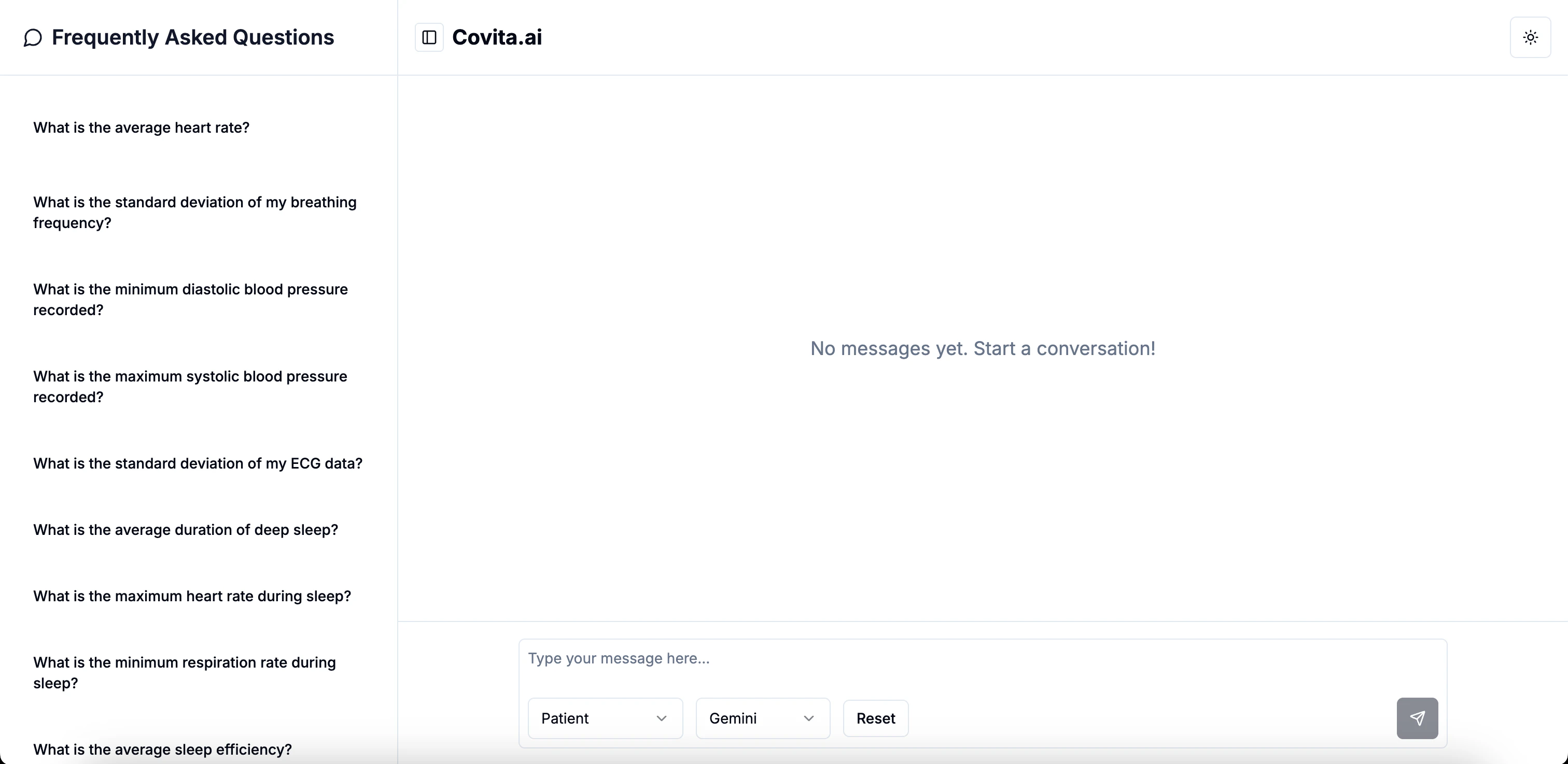
Covita Alpha is a comprehensive solution designed to analyze and provide insights from health data, including heart and sleep metrics. With its multi-agent approach and powerful features, Covita helps manage senior health monitoring efficiently.

<img className="block dark:hidden" src="https://mintcdn.com/nivara/BdU5x643xwbrBgr0/projects/covita/versions/v0.1/images/covita-alpha-0.1-light.png?fit=max&auto=format&n=BdU5x643xwbrBgr0&q=85&s=72b0ac2b31dcbe4f76e307e0d32f214f" alt="Covita Dashboard Light" width="3024" height="1474" data-path="projects/covita/versions/v0.1/images/covita-alpha-0.1-light.png" />

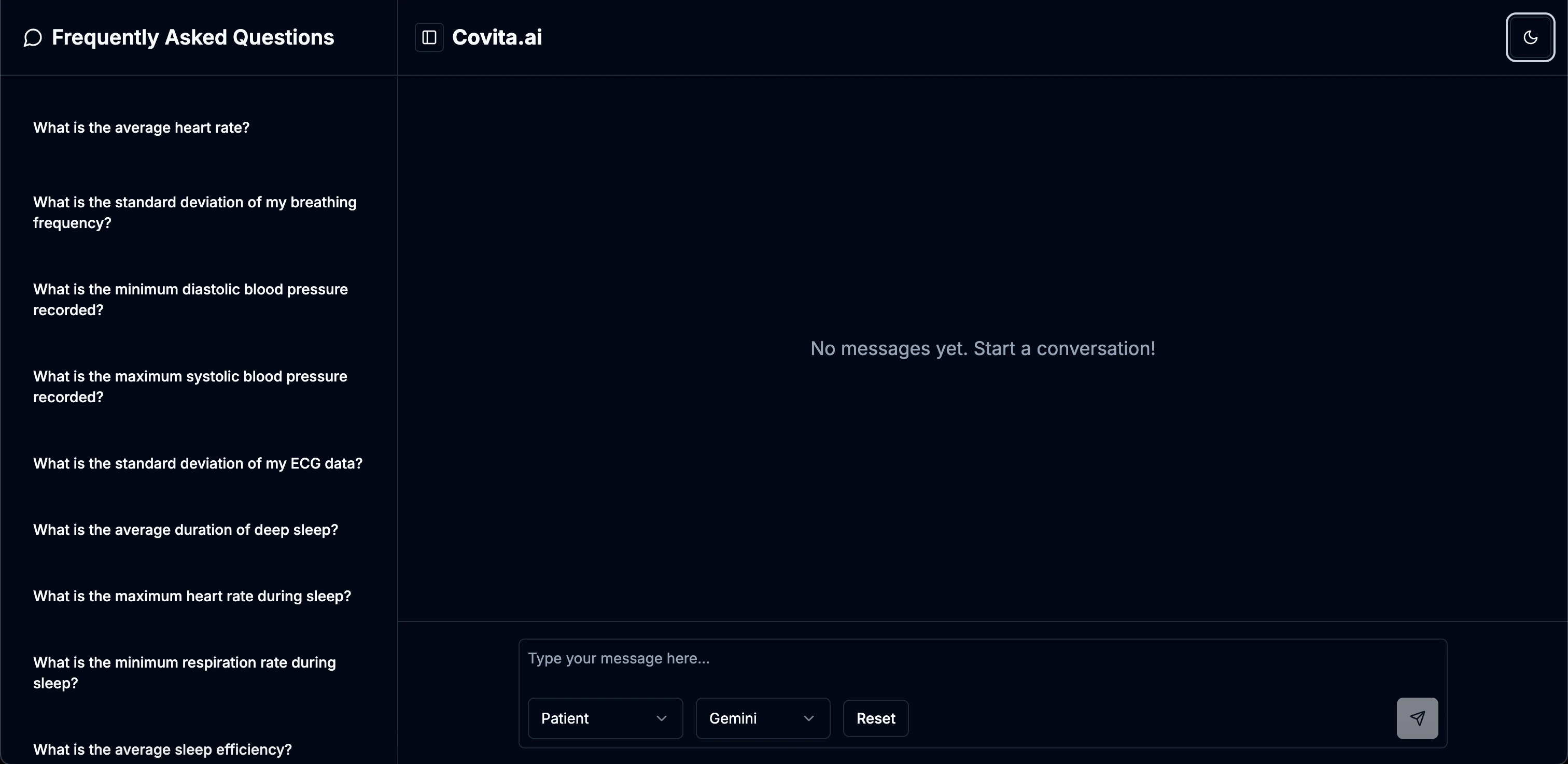
<img className="hidden dark:block" src="https://mintcdn.com/nivara/BdU5x643xwbrBgr0/projects/covita/versions/v0.1/images/covita-alpha-0.1-dark.png?fit=max&auto=format&n=BdU5x643xwbrBgr0&q=85&s=d3fe437c49201279fe7126c425d2568e" alt="Covita Dashboard Dark" width="3024" height="1474" data-path="projects/covita/versions/v0.1/images/covita-alpha-0.1-dark.png" />

### System Requirements

<div className="mt-4 p-4 border rounded-lg bg-gradient-to-r from-blue-50 to-indigo-50 dark:from-blue-900 dark:to-indigo-900">
  <h3 className="font-bold">Application Requirements</h3>

  <ul className="mt-2 space-y-2">
    <li> <strong>Web Browser:</strong> Latest version of Chrome, Firefox, Safari, or Edge</li>
    <li> <strong>Internet Connection:</strong> Required for accessing the application</li>
  </ul>
</div>

<Callout type="info">
  Covita Alpha is optimized for modern browsers and responsive design, allowing you to access it from any device with an internet connection.
</Callout>

## Quick Start

Follow these steps to quickly get started with Covita Alpha:

<Steps>
  <Step title="Access Covita">
    Visit [covita.nivara.io](https://covita.nivara.io) to access the Covita interface.
  </Step>

  <Step title="Select Agent Type">
    Choose your agent type (Patient, Coach, or Doctor) based on your role and needs.
  </Step>

  <Step title="Select Model">
    Choose your preferred model (OpenAI or Gemini) for interaction.
  </Step>

  <Step title="Start Interacting">
    Begin asking questions and interact with the selected agent to get insights from Patient 0's data.
  </Step>
</Steps>

### Core Components

Covita Alpha offers a comprehensive set of features designed to analyze health data:

<div className="space-y-8">
  <div className="p-6 border rounded-lg bg-gradient-to-r from-indigo-50 to-purple-50 dark:from-indigo-900 dark:to-purple-900">
    <h3 className="text-xl font-bold mb-4 flex items-center">
      <span className="mr-2">
        <i className="fas fa-heartbeat" />
      </span>

      Cardiovascular Monitoring
    </h3>

    <p className="mb-3">Comprehensive analysis of heart-related metrics with statistical insights and trend detection.</p>

    <ul className="space-y-2">
      <li>Heart rate analytics (min, max, average, trends)</li>
      <li>Blood pressure monitoring (systolic and diastolic)</li>
      <li>Statistical analysis with standard deviations</li>
      <li>ECG data processing</li>
    </ul>
  </div>

  <div className="p-6 border rounded-lg bg-gradient-to-r from-green-50 to-teal-50 dark:from-green-900 dark:to-teal-900">
    <h3 className="text-xl font-bold mb-4 flex items-center">
      <span className="mr-2">
        <i className="fas fa-bed" />
      </span>

      Sleep Quality Assessment
    </h3>

    <p className="mb-3">Detailed sleep metrics analysis with pattern recognition and efficiency measurements.</p>

    <ul className="space-y-2">
      <li>Deep sleep duration tracking and optimization</li>
      <li>Sleep efficiency scoring and analysis</li>
      <li>Heart rate during sleep monitoring</li>
      <li>Sleep duration and quality metrics with statistical analysis</li>
    </ul>
  </div>

  <div className="p-6 border rounded-lg bg-gradient-to-r from-blue-50 to-cyan-50 dark:from-blue-900 dark:to-cyan-900">
    <h3 className="text-xl font-bold mb-4 flex items-center">
      <span className="mr-2">
        <i className="fas fa-lungs" />
      </span>

      Respiratory Analysis
    </h3>

    <p className="mb-3">Advanced respiratory monitoring with trend analysis and statistical insights.</p>

    <ul className="space-y-2">
      <li>Breathing frequency monitoring (min, max, average)</li>
      <li>Respiration rate during sleep tracking</li>
      <li>Statistical variance analysis</li>
      <li>Respiratory pattern recognition</li>
    </ul>
  </div>

  <div className="p-6 border rounded-lg bg-gradient-to-r from-rose-50 to-pink-50 dark:from-rose-900 dark:to-pink-900">
    <h3 className="text-xl font-bold mb-4 flex items-center">
      <span className="mr-2">
        <i className="fas fa-chart-line" />
      </span>

      Advanced Analytics & Trends
    </h3>

    <p className="mb-3">Comprehensive trend analysis and relationship detection between different health metrics.</p>

    <ul className="space-y-2">
      <li>Multi-biomarker trend analysis</li>
      <li>ECG-heart rate relationship assessment</li>
      <li>Sleep disruption impact on heart rate</li>
      <li>Long-term heart rate trend monitoring</li>
    </ul>
  </div>

  <div className="p-6 border rounded-lg bg-gradient-to-r from-amber-50 to-orange-50 dark:from-amber-900 dark:to-orange-900">
    <h3 className="text-xl font-bold mb-4 flex items-center">
      <span className="mr-2">
        <i className="fas fa-shield-alt" />
      </span>

      Guardrails System
    </h3>

    <p className="mb-3">Ensures appropriate use of the system with role-specific limitations.</p>

    <ul className="space-y-2">
      <li>Patient agent: Limited to data analytics only</li>
      <li>Coach agent: Fitness and dietary recommendations</li>
      <li>Doctor agent: Medical recommendations and insights</li>
      <li>Content filtering and validation</li>
    </ul>
  </div>

  <div className="p-6 border rounded-lg bg-gradient-to-r from-violet-50 to-purple-50 dark:from-violet-900 dark:to-purple-900">
    <h3 className="text-xl font-bold mb-4 flex items-center">
      <span className="mr-2">
        <i className="fas fa-language" />
      </span>

      Natural Language Interface
    </h3>

    <p className="mb-3">Intuitive conversation-based interface for all agent interactions.</p>

    <ul className="space-y-2">
      <li>Natural language processing of health queries</li>
      <li>Contextual understanding of medical terminology</li>
      <li>Agent-specific response generation</li>
      <li>Conversational health data exploration</li>
    </ul>
  </div>
</div>

## Tech Stack

### Frontend

* **CSS, TypeScript**: Core web technologies

### Backend

* **FastAPI**: Modern, high-performance web framework for building APIs
* **PostgreSQL (on Google Cloud Platform)**: Database for storing patient health data
* **Python**: Programming language

### Deployment

* **Docker**: Containerization for consistent deployment
* **Cloud Run**: Serverless deployment platform
* **GitHub Actions**: CI/CD pipeline for automated deployment
* **Netlify**: Frontend hosting and deployment

## Agent Details

Covita uses an agent-based architecture powered by AI language models:

### Agent Implementation

* **Models Used**:
  * OpenAI o3-mini: Default model for all agent types
  * OpenAI GPT-4o: Advanced model option for detailed analysis
  * Gemini: Alternative model option available in UI
* **Framework**: Open AI Agents SDK for agent creation and management
* **Agent Types**:
  * Patient Agent: Provides data analysis without recommendations
  * Coach Agent: Offers fitness and dietary recommendations
  * Doctor Agent: Delivers medical insights and recommendations

### Agent Tools

Each agent has specialized tools for accessing and analyzing Patient 0's health data:

<AccordionGroup>
  <Accordion title="Cardiovascular Data Tools">
    <ul className="space-y-2">
      <li><code>get\_min\_heart\_rate</code>: Retrieves minimum heart rate value</li>
      <li><code>get\_max\_heart\_rate</code>: Retrieves maximum heart rate value</li>
      <li><code>get\_average\_heart\_rate</code>: Calculates average heart rate</li>
      <li><code>get\_average\_heart\_rate\_last\_month</code>: Retrieves heart rate average for past 30 days</li>
      <li><code>get\_min\_systolic\_blood\_pressure</code>: Gets minimum systolic reading</li>
      <li><code>get\_max\_systolic\_blood\_pressure</code>: Gets maximum systolic reading</li>
      <li><code>get\_average\_systolic\_blood\_pressure</code>: Calculates average systolic pressure</li>
      <li><code>get\_systolic\_blood\_pressure\_std</code>: Calculates standard deviation of systolic readings</li>
      <li><code>get\_min\_diastolic\_blood\_pressure</code>: Gets minimum diastolic reading</li>
      <li><code>get\_max\_diastolic\_blood\_pressure</code>: Gets maximum diastolic reading</li>
      <li><code>get\_average\_diastolic\_blood\_pressure</code>: Calculates average diastolic pressure</li>
      <li><code>get\_diastolic\_blood\_pressure\_std</code>: Calculates standard deviation of diastolic readings</li>
      <li><code>get\_ecg\_std</code>: Retrieves standard deviation of ECG measurements</li>
    </ul>
  </Accordion>

  <Accordion title="Respiratory Data Tools">
    <ul className="space-y-2">
      <li><code>get\_min\_breathing\_frequency</code>: Retrieves minimum breathing rate</li>
      <li><code>get\_max\_breathing\_frequency</code>: Retrieves maximum breathing rate</li>
      <li><code>get\_average\_breathing\_frequency</code>: Calculates average breathing frequency</li>
      <li><code>get\_breathing\_frequency\_std</code>: Calculates standard deviation of breathing rates</li>
      <li><code>get\_min\_respiration\_rate</code>: Gets minimum respiration rate during sleep</li>
      <li><code>get\_max\_respiration\_rate</code>: Gets maximum respiration rate during sleep</li>
      <li><code>get\_average\_respiration\_rate</code>: Calculates average respiration rate</li>
      <li><code>get\_respiration\_rate\_std</code>: Calculates standard deviation of respiration measurements</li>
    </ul>
  </Accordion>

  <Accordion title="Sleep Data Tools">
    <ul className="space-y-2">
      <li><code>get\_min\_deep\_sleep\_duration</code>: Gets minimum deep sleep time</li>
      <li><code>get\_max\_deep\_sleep\_duration</code>: Gets maximum deep sleep time</li>
      <li><code>get\_average\_deep\_sleep\_duration</code>: Calculates average deep sleep duration</li>
      <li><code>get\_deep\_sleep\_duration\_std</code>: Calculates standard deviation of deep sleep periods</li>
      <li><code>get\_min\_sleep\_heart\_rate</code>: Retrieves minimum heart rate during sleep</li>
      <li><code>get\_max\_sleep\_heart\_rate</code>: Retrieves maximum heart rate during sleep</li>
      <li><code>get\_average\_sleep\_heart\_rate</code>: Calculates average heart rate during sleep</li>
      <li><code>get\_sleep\_heart\_rate\_std</code>: Calculates standard deviation of sleep heart rate</li>
      <li><code>get\_min\_sleep\_efficiency</code>: Gets minimum sleep efficiency score</li>
      <li><code>get\_max\_sleep\_efficiency</code>: Gets maximum sleep efficiency score</li>
      <li><code>get\_average\_sleep\_efficiency</code>: Calculates average sleep efficiency</li>
      <li><code>get\_sleep\_efficiency\_std</code>: Calculates standard deviation of sleep efficiency</li>
      <li><code>get\_min\_total\_sleep\_time</code>: Gets minimum total sleep duration</li>
      <li><code>get\_max\_total\_sleep\_time</code>: Gets maximum total sleep duration</li>
      <li><code>get\_average\_total\_sleep\_time</code>: Calculates average total sleep time</li>
      <li><code>get\_total\_sleep\_time\_std</code>: Calculates standard deviation of sleep durations</li>
    </ul>
  </Accordion>

  <Accordion title="Analysis & Reporting Tools">
    <ul className="space-y-2">
      <li><code>get\_current\_datetime</code>: Retrieves current date and time for reporting</li>
      <li><code>get\_sleep\_metrics\_summary</code>: Generates comprehensive sleep quality report</li>
      <li><code>analyze\_ecg\_heart\_rate\_relationship</code>: Examines correlation between ECG and heart rate</li>
      <li><code>get\_heart\_rate\_trends</code>: Analyzes heart rate changes over time</li>
      <li><code>analyze\_sleep\_disruptions\_heart\_rate\_relationship</code>: Studies impact of sleep disruptions on heart rate</li>
      <li><code>get\_all\_biomarker\_trends</code>: Comprehensive analysis of all health metrics and their trends</li>
    </ul>
  </Accordion>
</AccordionGroup>

## Other Experiments

<Note>
  During the development of Covita Alpha, we experimented with various LLM providers to evaluate their performance and compatibility with our system.
</Note>

<Tabs>
  <Tab title="Anthropic">
    <div className="p-6 border rounded-lg bg-gradient-to-r from-purple-50 to-indigo-50 dark:from-purple-900 dark:to-indigo-900">
      <h3 className="text-xl font-bold mb-4 flex items-center">
        <span className="mr-2">
          <i className="fas fa-flask" />
        </span>

        Claude Compatibility Issues
      </h3>

      <div className="mb-4">
        <p className="mb-3">We evaluated Claude as an alternative model for our agent implementation but found compatibility issues:</p>

        <div className="mt-4 p-4 border-l-4 border-purple-500 bg-purple-50 dark:bg-purple-900/30">
          <h4 className="font-semibold mb-2">Key Findings</h4>

          <li>Claude doesn't support structured responses required by OpenAI Agents SDK</li>
          <li>Incompatible with the Pydantic-based architecture of our system</li>
        </div>
      </div>

      <div className="mt-6">
        <h4 className="font-semibold mb-2">Conclusion</h4>
        <p>While Claude showed promising natural language capabilities, its incompatibility with our OpenAI Agents SDK framework made integration unfeasible for this version.</p>
      </div>
    </div>
  </Tab>

  <Tab title="DeepSeek">
    <div className="p-6 border rounded-lg bg-gradient-to-r from-blue-50 to-cyan-50 dark:from-blue-900 dark:to-cyan-900">
      <h3 className="text-xl font-bold mb-4 flex items-center">
        <span className="mr-2">
          <i className="fas fa-flask" />
        </span>

        DeepSeek Integration Attempt
      </h3>

      <div className="mb-4">
        <p className="mb-3">We explored DeepSeek's integration with our system but encountered significant compatibility issues:</p>

        <div className="mt-4 p-4 border-l-4 border-blue-500 bg-blue-50 dark:bg-blue-900/30">
          <h4 className="font-semibold mb-2">Technical Challenges</h4>

          <li>Lack of support for structured responses required by our agent framework</li>
          <li>Incompatible with the Pydantic foundation of OpenAI Agents SDK</li>
          <li>Unable to reliably follow the structured output format needed</li>
        </div>
      </div>

      <div className="mt-6">
        <h4 className="font-semibold mb-2">Conclusion</h4>
        <p>DeepSeek's models, while powerful for general use, proved incompatible with the structured response requirements of our agent architecture.</p>
      </div>
    </div>
  </Tab>

  <Tab title="Comparison">
    <div className="p-6 border rounded-lg bg-gradient-to-r from-gray-50 to-slate-50 dark:from-gray-900 dark:to-slate-900">
      <h3 className="text-xl font-bold mb-4">Model Comparison Summary</h3>

      <div className="overflow-x-auto">
        <table className="min-w-full bg-white dark:bg-gray-800 rounded-lg overflow-hidden">
          <thead className="bg-gray-100 dark:bg-gray-700">
            <tr>
              <th className="px-4 py-3 text-left">Feature</th>
              <th className="px-4 py-3 text-left">OpenAI o3-mini</th>
              <th className="px-4 py-3 text-left">Gemini</th>
              <th className="px-4 py-3 text-left">DeepSeek/Claude</th>
            </tr>
          </thead>

          <tbody className="divide-y divide-gray-200 dark:divide-gray-600">
            <tr>
              <td className="px-4 py-3 font-medium">Structured Responses</td>
              <td className="px-4 py-3 text-green-600 dark:text-green-400">Excellent</td>
              <td className="px-4 py-3 text-green-600 dark:text-green-400">Good</td>
              <td className="px-4 py-3 text-red-600 dark:text-red-400">Unsupported</td>
            </tr>

            <tr>
              <td className="px-4 py-3 font-medium">OpenAI Agents SDK Compatibility</td>
              <td className="px-4 py-3 text-green-600 dark:text-green-400">Native</td>
              <td className="px-4 py-3 text-yellow-600 dark:text-yellow-400">Adaptable</td>
              <td className="px-4 py-3 text-red-600 dark:text-red-400">Incompatible</td>
            </tr>

            <tr>
              <td className="px-4 py-3 font-medium">Pydantic Integration</td>
              <td className="px-4 py-3 text-green-600 dark:text-green-400">Built-in</td>
              <td className="px-4 py-3 text-yellow-600 dark:text-yellow-400">Possible</td>
              <td className="px-4 py-3 text-red-600 dark:text-red-400">Not supported</td>
            </tr>

            <tr>
              <td className="px-4 py-3 font-medium">Health Data Understanding</td>
              <td className="px-4 py-3 text-green-600 dark:text-green-400">Excellent</td>
              <td className="px-4 py-3 text-green-600 dark:text-green-400">Good</td>
              <td className="px-4 py-3 text-green-600 dark:text-green-400">Good</td>
            </tr>

            <tr>
              <td className="px-4 py-3 font-medium">Implementation Ease</td>
              <td className="px-4 py-3 text-green-600 dark:text-green-400">High</td>
              <td className="px-4 py-3 text-yellow-600 dark:text-yellow-400">Medium</td>
              <td className="px-4 py-3 text-red-600 dark:text-red-400">Low</td>
            </tr>
          </tbody>
        </table>
      </div>

      <div className="mt-6">
        <h4 className="font-semibold mb-2">Final Decision</h4>
        <p>Based on our evaluation, we selected OpenAI models as our primary solution, with Gemini as an alternative option accessible through the UI. Both options provide the structured response capabilities required by our agent architecture.</p>
      </div>
    </div>
  </Tab>
</Tabs>

<div className="mt-8 p-4 border rounded-lg bg-blue-50 dark:bg-blue-900">
  <h3 className="font-bold text-center">Need Help?</h3>

  <p className="text-center mt-2">
    If you encounter any issues or have questions, our team is here to help.
  </p>

  <div className="flex justify-center mt-4">
    <a href="mailto:desk@nivara.io" className="px-4 py-2 bg-blue-600 text-white rounded-md hover:bg-blue-700 transition-colors">
      Contact Us
    </a>
  </div>
</div>
